Page 2 of 2
Re: Listen to 5001 but no client show up
Posted: Thu Mar 19, 2026 7:49 pm
by Gonzo
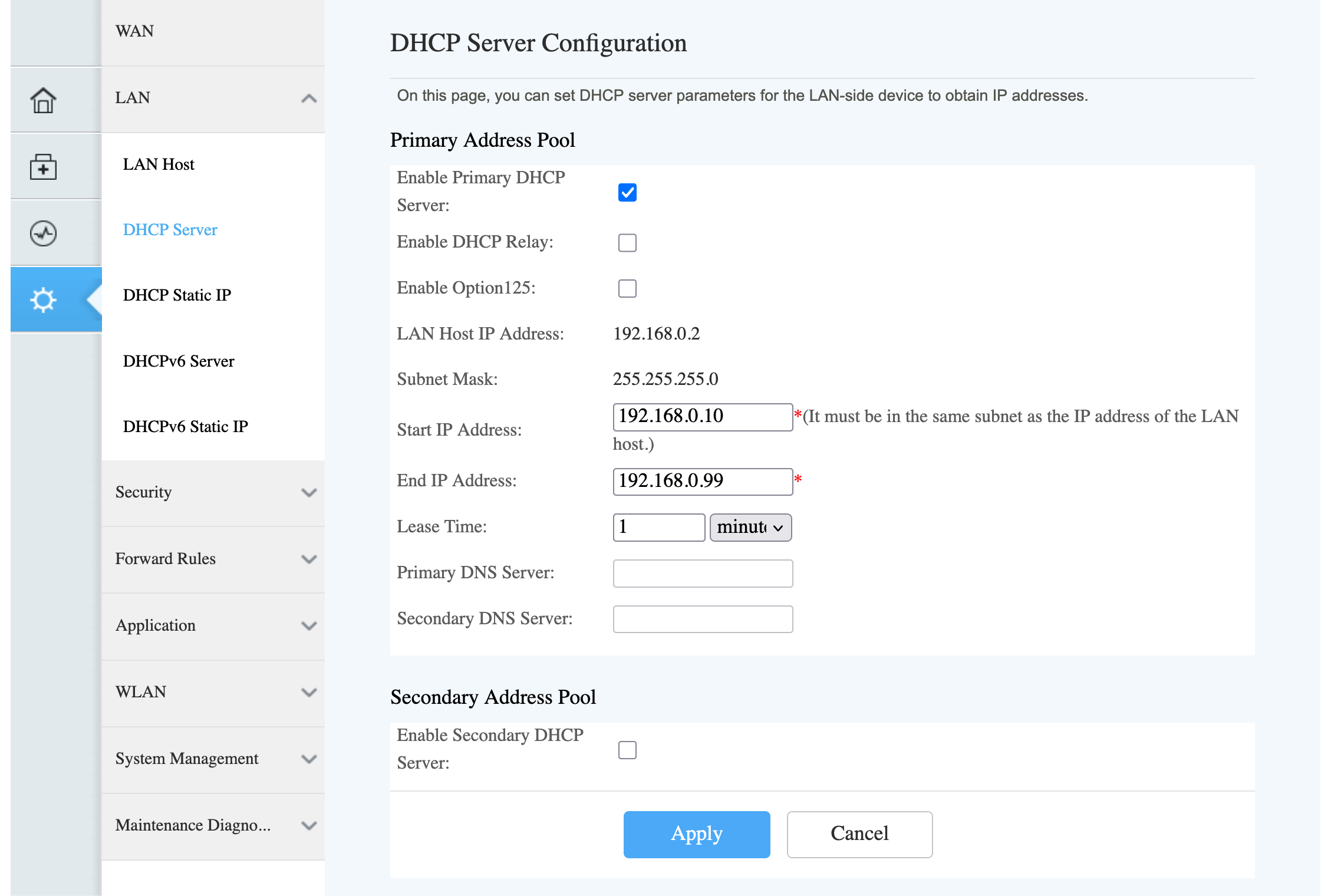
OK. I switched completely to the Huawei Router. But I remember now why I put the access point in between. I can't change the DNS server. The fields are grayed out. This is a clear statement of my ISP: "I want to spy on you" What would you do? I need to change it in every device that access this router. I don't like that.
- Screenshot 2026-03-19 at 14.43.54.png (349.64 KiB) Viewed 101605 times
Re: Listen to 5001 but no client show up
Posted: Thu Mar 19, 2026 10:44 pm
by boss
I guess you mean the fields:
Primary DNS server.
and
Secondary DNS server.
As shown in your attachment are greyed out and cannot be modified.
Is that the case?
If that is so, and you wish to change the DNS servers, your only option is to disable DHCP in your ISP router and enable it in the access point.
That is fine, you just need to get something a lot better than the WR840N.
It seems your ISP has locked down their router to prevent most changes.
How fast is your internet connection?
What country are you in?
Re: Listen to 5001 but no client show up
Posted: Thu Mar 19, 2026 11:08 pm
by Gonzo
I decided to manually set DNS in each device I use in my LAN and take the WR840N completely out of my LAN. There are only 4 devices so the additional work is quite limited.
Speed: Download Mbps 72.49
Re: Listen to 5001 but no client show up
Posted: Fri Mar 20, 2026 1:28 am
by boss
Is that final setup just having DNS enabled on your devices.
Or
Is DHCP also turned off on your HG8145V5 router and you have fixed IP's on each of your devices?
Re: Listen to 5001 but no client show up
Posted: Fri Mar 20, 2026 3:07 am
by Gonzo
That final setup having DNS redirected on my WIFI devices (1.1.1.1). Except guests. All the Ethernet devices have fix IP's. Desktop computer 2x, PS3, PS4. All the WIFI devices have DHCP. iPhones and all the guests who need internet.
A little special: On my desktops dnscrypt-proxy is running and DNS is routed to 127.0.0.1
The fix IP's are in the range from 101 to 199, DHCP is in the range 11 to 99.
Re: Listen to 5001 but no client show up
Posted: Fri Mar 20, 2026 1:46 pm
by boss
The reason I asked was because of phones etc but you seem to have that covered.
Cheers