Page 1 of 2
Custom Renderer
Posted: Tue Jul 15, 2025 8:18 am
by malcalevak
I'm trying to build a custom renderer, as my TV isn't one of the supported ones. Currently, I've yet to find a file it doesn't play, but I always have to go into the Transcode folder, and manually select to play it without transcoding.
I've been able to get h264 files to show up, but for the life of me, I can't seem to get most of the h265 files to show up. They are mostly HDR files, which I thought might have been the problem, but even adding in the hdr field doesn't seem to do anything.
Clearly, I'm doing something wrong.
The "Supported line" that I've added, thinking it would make a difference, is:
Supported = f:mp4 v:h265 a:aac-lc|he-aac|ac3|eac3|lpcm|mp3|mpa m:video/mp4 hdr:dolbyvision|hdr10|hdr10+
The files I was trying to get to show up were mp4s encoded with x265, audio eac3, and HDR10.
I'm adding the custom config as an attachment.
Re: Custom Renderer
Posted: Tue Jul 15, 2025 3:16 pm
by mik_s
You should copy another similar conf and modify that.
That test.conf is basically a copy of the DefaultRenderer.conf which is just documentation on what all the setting are, it is not functional as it is and blank settings could have an unwanted effect.
The important settings like
UserAgentSearch or
UpnpDetailsSearch have not been set so there is no way UMS would know to use this for your TV.
The supported format section at the end looks about right but without something for UMS to match on it won't be used.
This shows how to set up your own conf
What is the make and model of your TV? I could probably tweak a similar one to match yours then you can modify the supported formats if it is not quite right.
There might actually be one for a very similar model with the same capabilities but just is not matching your TV's model number.
It would also help if you posted your logs to see how UMS identifies it.
The logs will also be helpful in finding what decision UMS makes in streaming or transcoding.
Re: Custom Renderer
Posted: Wed Jul 16, 2025 5:03 am
by malcalevak
Thanks for the response! I'd thought clicking on the icon in the UMS window that brings up the device settings and then clicking on the conf link at the top would generate enough information to link it.
The TV itself, I'm just copying everything from Amazon, is a: Hisense 55-Inch Class U7 Series Mini-LED ULED 4K UHD Google Smart TV (55U7N, 2024 Model) - QLED, Native 144Hz, Motion Rate 480, Full Array Local Dimming, Game Mode Pro, Alexa Compatibility
I think the important bit here is 55USN, 2024 Model.
Re: Custom Renderer
Posted: Wed Jul 16, 2025 5:59 am
by malcalevak
As requested, here are my logs.
Re: Custom Renderer
Posted: Wed Jul 16, 2025 2:54 pm
by boss
I am assuming it is the Hisense 55U7N as I can't find anything for a 55USN model.
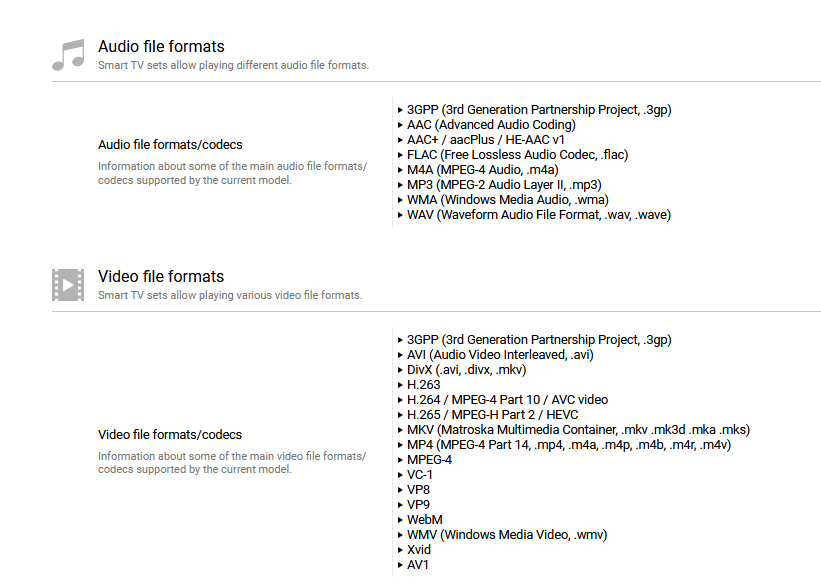
- Screenshot 2025-07-16 105500.png (82.21 KiB) Viewed 358679 times
Re: Custom Renderer
Posted: Wed Jul 16, 2025 4:30 pm
by malcalevak
You're right, it was in the pasted line, but when I typed it out after, I fat fingered it. My bad.
Re: Custom Renderer
Posted: Wed Jul 16, 2025 5:27 pm
by mik_s
It's a bit tricky making a conf for this TV as it does not identify itself properly so I can see why there is not a conf for it already.
Code: Select all
        <dlna:X_DLNADOC xmlns:dlna="urn:schemas-dlna-org:device-1-0">DMR-1.50</dlna:X_DLNADOC>
        <friendlyName>Xxxx's TV</friendlyName>
        <manufacturer>SmartTV</manufacturer>
        <manufacturerURL>http://www.smarttv.com</manufacturerURL>
        <modelDescription>Smart TV MediaRenderer 1.0</modelDescription>
        <modelName>Renderer</modelName>
        <modelNumber>1.0</modelNumber>
I guess friendlyName might have had the model number which could be used but as it can be changed by the user like it has here it is unreliable.
Everything else is too generic to identify it.
The only thing I can really make a match on is "SmartTV"
It does advertise a multiscreen function which does at least show the manufacturer that may work but could sent the videos to the wrong port of the TV so don't think I can use this
Code: Select all
<deviceType>urn:dial-multiscreen-org:device:dial:1</deviceType>
<friendlyName>Xxxx's TV</friendlyName>
<manufacturer>Hisense</manufacturer>
<modelName>SmartTV 4K FFM</modelName>
I did find a manual for the U7N
here which gives more info on what is supported but not had time to put this in a conf yet, but I have made a start. I'll see if I can get it done tomorrow.
Re: Custom Renderer
Posted: Wed Jul 16, 2025 6:57 pm
by boss
On my LG WebOS TV's I can give each of the TV's a different name in the TV settings.
EG:
LG-WebOSTV-1
LG-WebOSTV-2
LG-WebOSTV-3
Etc.
The TV's broadcast this information to UMS.
DEBUG 2025-07-14 17:25:14.732 [jupnp-remote-listener 44-1] Matched media renderer "LG WebOS TV" based on dlna details "LG-WebOSTV-2 192.168.0.15 613176e6-f23f-6405-8c70-62536d9ba025 LG Electronics LG Smart TV 55UJ652T-TB
http://www.lge.com http://www.lge.com"
I see that the Hisense 55U7N has the facility to give the TV a name in the TV settings.
Just wondering if the TV is given a name can this name be used to select the conf file by adding the TV name to UserAgentSearch or UpnpDetailsSearch
Re: Custom Renderer
Posted: Thu Jul 17, 2025 3:36 pm
by mik_s
@boss yeah you can match on a custom name but not very good for a general conf for Hisense TVs.
I think this may be what people will have to use as there is nothing else reliable to match on.
I found a better source for that manual
here in PDF format but not sure if it is actually for this TV as the model number on the first page is ES-A23031Q, but I can't find any info about this model number so it may just be the E-manual for all Hisense TVs.
Since I found no other info I based the conf on this so it may not be entirely correct. Any other changes you will have to do yourself.
I had to guess on what transcoding settings will work so you will have to experiment to find what works, I have left some notes on what to try and change if you do need to transcode. I don't even know if subtitles are supported so I added the most common ones just in case and should at least prevent unnecessary transcoding of video with subs.
Copy this conf to
C:\ProgramData\UMS\renderers and restart UMS and hopefully it will be used.
If there are any problems make some logs so I can see if it is being used.
Re: Custom Renderer
Posted: Fri Jul 18, 2025 8:06 am
by malcalevak
Success!
I did change the RendererName and friendlyName, since the auto-generated file showed the RenderedName as the same value.
I'll experiment with the SeekByTime when I get a chance, see if it works as expected, and maybe poke around a bit more.
That all said, I greatly appreciate the assistance in getting this working properly! Now to create some new posts for unrelated and less important issues.