Page 1 of 2
MacOS crash
Posted: Mon Dec 01, 2025 9:01 am
by SYNERGIST
Not working
Crashing 20 sec after start
I am on Mac OS 11.7 using UMS 15.1
Attached please find the log
Re: [Solved] FATAL ERROR: Unable to start upnp service
Posted: Mon Dec 01, 2025 3:06 pm
by mik_s
As what you posted was not helpful and not in the usual format.
I cannot trust that so removed it without looking at it.
Please post your logs following the instructions in the red section above.
Re: FATAL ERROR: Unable to start upnp service - MacOS
Posted: Wed Dec 03, 2025 3:19 am
by SYNERGIST
Sorry try this:
MacOS crash
Posted: Wed Dec 03, 2025 5:01 am
by mik_s
I checked your logs but could not see anything wrong in them, but they just stop after 50 min.
The last thing it was doing was the media scan and about 95% of the logs were this.
I assume you are unable unable to follow the instructions due to it crashing as the zip file does not have your configuration files.
What exactly happens when it crashes? Is there an error message? Could you post a screenshot.
I don't see the "Unable to start upnp service" message, this starts successfully so have renamed this thread.
Code: Select all
DEBUG 2025-12-02 15:22:55.626 [main] org.jupnp.UpnpServiceImpl UPnP service started successfully
You do seem to have a vast media library so maybe the database has gotten too large and triggered this crash.
Try only sharing a few small folders and see if it still crashes, if it does then this will be unrelated.
Your computer only has 4GB memory and only a little over 800MB free at the start so maybe it is running out while scanning.
Code: Select all
  CPU: Intel(R) Core(TM) i5-4258U CPU @ 2.40GHz with 2 cores (4 virtual cores) (Haswell (Client))
  Physical Memory: 4 GiB
  Free Memory: 821.4 MiB
I have nowhere near the amount of files shared on my computer and UMS has reserved nearly 600MB for me according to task manager.
Re: MacOS crash
Posted: Wed Dec 03, 2025 5:17 am
by SYNERGIST
Thanks for the quick response.
It does seem to be related to scanning. I do have a mirror of the files being scanned by mini DLNA under Linux on a much smaller machine. It does not crash (unfortunatly no transcoder access for H265 which is why I prefer UMS).
Thanks again, I will try increasing the available RAM.
Re: MacOS crash
Posted: Wed Dec 03, 2025 5:49 am
by SYNERGIST
I turned off the thumbnails, this should reduce memory requirements.
Re: MacOS crash
Posted: Wed Dec 03, 2025 6:39 am
by SYNERGIST
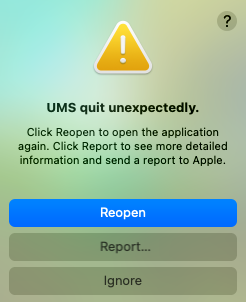
Well that didn't help:
- Screenshot 2025-12-02 at 19.37.29.png (59.26 KiB) Viewed 120478 times
Re: MacOS crash
Posted: Wed Dec 03, 2025 6:48 am
by SYNERGIST
RE the last crash with the screen shot: I had started the scan manually, so still related.
Re: MacOS crash
Posted: Thu Dec 04, 2025 2:19 am
by SYNERGIST
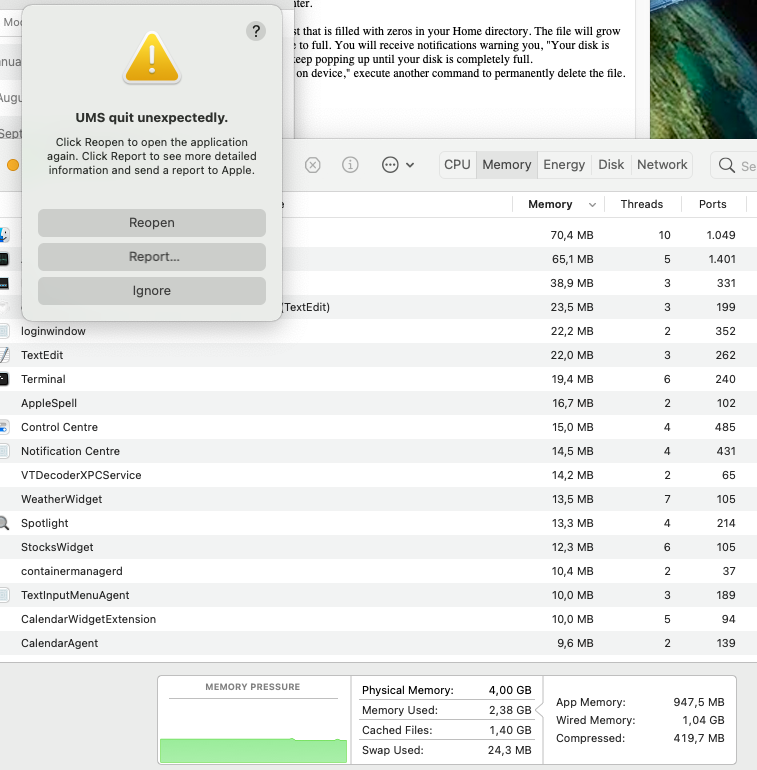
- Screenshot 2025-12-03 at 15.11.18.png (180.71 KiB) Viewed 120409 times
I cleared the cache using dd if=/dev/zero bs=100m of=~/Test
When I started the scan the cache was practically empty.
I will now try scanning incrementally.
Re: MacOS crash
Posted: Thu Dec 04, 2025 10:13 pm
by mik_s
I know very little about Macs but I think it could be it could be running out of resources like memory.
I have seen in logs from Linux that it does show errors when memory is low so if this is what is happening I don't know why it would not show here too.
That error message it shows is not very helpful.
Does it give more information when clicking on report or does this just send it straight to Apple?
If it does open a detailed report can you copy this to a txt file and post that here?
I don't think the thumbnails will have any effect if turned off though as these will still be stored in the database, just not sent to the renderer and no new ones will be generated.
Did you try only sharing a few small folders instead of your whole media library?
If those work fine then you can gradually add in more folders and only those new ones will need to be scanned which will lessen the load on the computer instead of doing it all at once.
Once the files have been scanned UMS will not need to do it again and only those new files will be scanned.
Are you sharing the whole drive as I do see partially downloaded torrent files that really should not be scanned.
For those you can set up your torrent program to move completed downloads to another folder that you can set as a shared folder separately.