Page 1 of 1
update/index music database after folder content change
Posted: Tue Mar 10, 2026 10:24 am
by Lammerts
when i did a fresh install of UMS it took some time for UMS to index all audio files (MP3, FLAC, DTS)
I made some changes in folder structure and found UMS giving some errors not finding files.
Is there a way to delete/remove/update the database?
Re: update/index music database after folder content change
Posted: Tue Mar 10, 2026 12:24 pm
by mik_s
If you just want to re-scan your media it might be better to use the "Reset the cache" option in the settings.
This will re-scan to update metadata but will leave played status alone.
This should also clean up entries for files that do not exist but that should happen automatically.
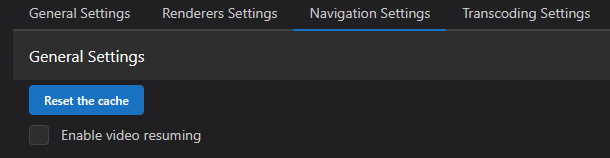
- Screenshot 2026-03-10 000945.png (7.94 KiB) Viewed 126899 times
If you need to delete the database it is located in your configuration folder.
On windows it is "C:\ProgramData\UMS\database"
On Linux, from your previous logs on it is "/home/ums/.config/UMS/database" but I think this could be different on other versions of Linux.
Make sure UMS is not running when you delete it. When UMS is started again a new one will be made and fully scans all your media.
If you move files around UMS will update the database by removing the original entries if they cannot be found, and creating new entries for the new location as long as it is in a shared folder.
The "error" messages are not errors but just notifying of this change and would disappear when UMS is restarted.
Re: update/index music database after folder content change
Posted: Tue Mar 10, 2026 9:34 pm
by Lammerts
Thanks for the explanation. I will test the clear Cache option.
I found out there is a hidden folder (on Linux) home/ums/.config/UMS/database in where there are 3 files. 1 file is about 103Mb and i guess this one holds the media data.
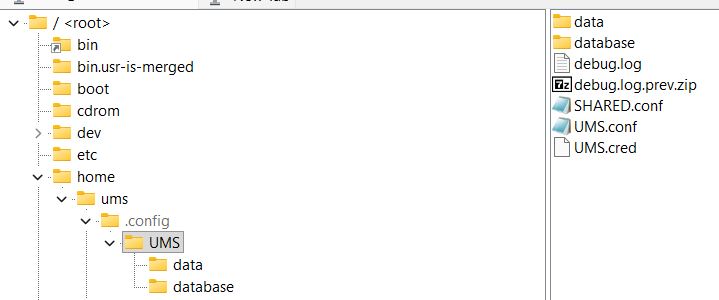
- ums1.JPG (23.67 KiB) Viewed 126882 times
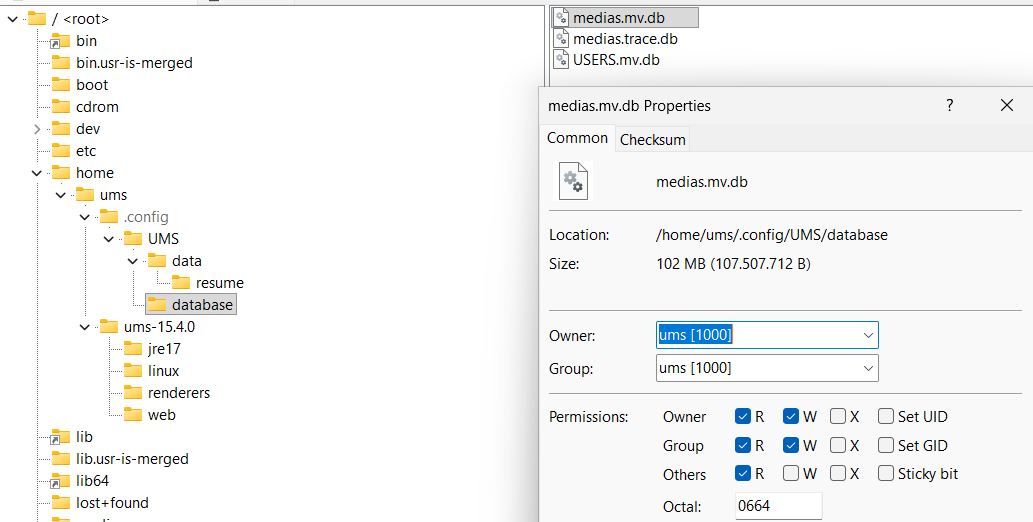
- ums2.JPG (60.98 KiB) Viewed 126882 times