I can see it is using the LG TV 2023+.conf which is correct as it also covers 2024 models.
Looking at the decision on what files to transcode I see some use vp9 (eg L'Accusé.mp4) which is not supported so have to be transcoded.
Some are using lpcm audio (eg Phil Collins - Live and Loose in Paris.avi) or adpcm (eg CIMG0067.MOV) in avi which is not listed as supported but the manual says it is so I can tweak that.
A few AVIs (Lockout.avi) have a
Muxing mode "Packed bitstream" which I have not seen before and does not match any supported format. I don't think there is a way to do a good match on these.
For "In The Flesh - live.mp4" it has
subtitles format "UNKNOWN" so causes it to transcode.
Some use mjpeg (eg P1010079.MOV) which is not listed in the manual as supported. I think this is an old mpeg format so it may be able to play.
Try playing from the #--TRANSCODE--# folder and choose "No transcoding". If it plays well then I can add as that format to the conf.
For the others if they can play without transcoding then you might have to manually select no transcode each time or re-encode those yourself.
Since that conf is using the MPEGTS-H265-AC3 profile (needed for 4k content) for transcoding you really need to use the GPU to do it in hardware as it takes a lot of processing.
That is probably the cause of it not working well for those unsupported formats.
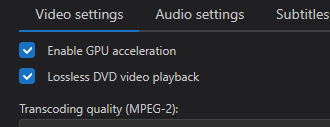
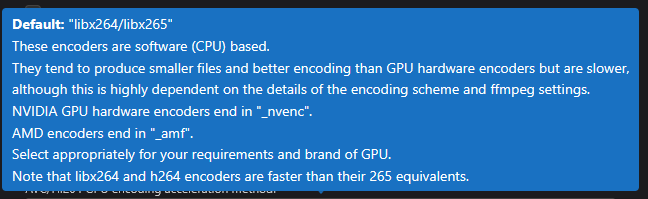
If you have a GPU that has its own encoder you can enable HEVC/H.265 GPU encoding acceleration in transcoding settings and enable the GPU.
- Screenshot 2025-03-10 221130.png (6.57 KiB) Viewed 9131 times
- GPU acceleration method tooltip.png (20.3 KiB) Viewed 9131 times
Or if you never intend to play 4k then you can change the transcoding profile to MPEGTS-H264-AC3, but I think the vp9 codec is used for 4K.
I have added lpcm and adpcm to avi videos. Could you test this and confirm it works so I can request that change in the original conf.
Copy this to
/home/jps/.config/UMS/renderers/ and restart UMS. If that folder does not exist then just create it.
 LG-TV-2023+mod.conf