
Not working Samsung s95 Oled
Forum rules
Please make sure you follow the Problem Reporting Guidelines before posting if you want a reply
Please make sure you follow the Problem Reporting Guidelines before posting if you want a reply
Not working Samsung s95 Oled
Hello.
It is not working by defaul. I will attach debug. But what i really want it is the server to just transcode DTS sound when needed.
Every film i watch is mkv h264 or h265 and the TV support it no problem. And almost every audio codec, except DTS, DTS-HD.
So when i select "Dont transcode anything" it works perfect. But when i want to watch a movie with DTS sound i have to transcode it first by hand using ffmpeg to eac3 or ac3 5.1 and then watch the film without transconding.
Could you help me to create a renderer file config or something, please? I do not even know what renderer file is using right now, debug is confusing.
What i really want is to dont transcode any video and just transcode DTS sound.
Thanks.
It is not working by defaul. I will attach debug. But what i really want it is the server to just transcode DTS sound when needed.
Every film i watch is mkv h264 or h265 and the TV support it no problem. And almost every audio codec, except DTS, DTS-HD.
So when i select "Dont transcode anything" it works perfect. But when i want to watch a movie with DTS sound i have to transcode it first by hand using ffmpeg to eac3 or ac3 5.1 and then watch the film without transconding.
Could you help me to create a renderer file config or something, please? I do not even know what renderer file is using right now, debug is confusing.
What i really want is to dont transcode any video and just transcode DTS sound.
Thanks.
- Attachments
-
- ums_dbg_2026-08-18-16-38.zip
- (143.16 KiB) Downloaded 255 times

Re: Not working Samsung s95 Oled
There is only one video in the logs and it has dtshd audio so is correctly being transcoded.
If other videos without DTS audio are being transcoded I will need to see them in the logs to know why.
One odd thing is your renderer conf was not included in the logs so I cannot confirm exactly which conf it is using. You might have unchecked that box while packing the logs.
I think it might be using the correct one though as it does mention "Samsung UHD TV 2019+" which it gets from the Samsung-TV-2019+.conf
You do not need to manually transcode by hand first as that is what UMS does automatically if the video uses a format not listed as supported in the conf.
I think the video stream should not be transcoded though, just the audio, and should work by remuxing.
I don't know exactly what is needed to get this working but I think the video codec has to match the transcoding profile.
In this conf it is set to MPEGTS-H264-AC3 but that video uses h265 so would make it transcode.
I think if it was set to MPEGTS-H265-AC3 it should remux instead but would take more processing if a full transcode was needed. If you have a decent GPU you can set that to do the work.
I'm not sure but I think you can set both profile to be used which would prevent unnecessary transcoding.
I have made a test conf for you to try that should remux for both h264 and h265 videos.
If that does not work I have modded another one to just use the MPEGTS-H265-AC3 profile
Try the test one first and do some logs showing it playing both h264 and h265 videos that use DTS audio to confirm it works.
If not then you can use the mod one to only use h265
Copy them one at a time to C:\ProgramData\UMS\renderers and restart UMS.
Don't have both there as one will overwrite the other.
If other videos without DTS audio are being transcoded I will need to see them in the logs to know why.
One odd thing is your renderer conf was not included in the logs so I cannot confirm exactly which conf it is using. You might have unchecked that box while packing the logs.
I think it might be using the correct one though as it does mention "Samsung UHD TV 2019+" which it gets from the Samsung-TV-2019+.conf
You do not need to manually transcode by hand first as that is what UMS does automatically if the video uses a format not listed as supported in the conf.
I think the video stream should not be transcoded though, just the audio, and should work by remuxing.
I don't know exactly what is needed to get this working but I think the video codec has to match the transcoding profile.
In this conf it is set to MPEGTS-H264-AC3 but that video uses h265 so would make it transcode.
I think if it was set to MPEGTS-H265-AC3 it should remux instead but would take more processing if a full transcode was needed. If you have a decent GPU you can set that to do the work.
I'm not sure but I think you can set both profile to be used which would prevent unnecessary transcoding.
I have made a test conf for you to try that should remux for both h264 and h265 videos.
If that does not work I have modded another one to just use the MPEGTS-H265-AC3 profile
Try the test one first and do some logs showing it playing both h264 and h265 videos that use DTS audio to confirm it works.
If not then you can use the mod one to only use h265
Copy them one at a time to C:\ProgramData\UMS\renderers and restart UMS.
Don't have both there as one will overwrite the other.
- Attachments
-
 Samsung-TV-2019+ test.conf
- (10.53 KiB) Downloaded 215 times
-
- Samsung-TV-2019+ mod.conf
- (10.51 KiB) Downloaded 238 times
Logs are important for us to help, Please follow This Link before asking for support. Just a forum cleaner, Will help if I can but no expert.
Re: Not working Samsung s95 Oled
Ok thanks, i will try them out.
But the debug i sent, the video was not being played on the TV. It just gives and error and the TV even disconnects from the network.
But i dont want to transcode the video, i just want to transcode the DTS-HD track to eac3 5.1 or ac3 5.1. That is what i do mannually and then just set "Dont transcode anything" and plays good.
Thanks
But the debug i sent, the video was not being played on the TV. It just gives and error and the TV even disconnects from the network.
But i dont want to transcode the video, i just want to transcode the DTS-HD track to eac3 5.1 or ac3 5.1. That is what i do mannually and then just set "Dont transcode anything" and plays good.
Thanks
Re: Not working Samsung s95 Oled
Transcoding just one stream and leaving the rest alone is called (re)muxing and those other confs should help with that by changing the transcoding profile.
I'm making assumptions as you did not include the conf being used and only played the one video that should be transcoded.
I don't know how it would handle other formats.
If that video is not playing it may be your computer cannot keep up with transcoding as it is 4K as it takes a lot of processing and may be too slow to start which times out the TV. Lots of subtitles can cause this too.
Maybe the bitrate is too high to use h264 for transcoding.
If you have a decent graphics card enable GPU acceleration, HEVC/H.265 and AVC/H.264 GPU encoding acceleration methods to use the hardware encoder.
Another option is to try using HLS transcoding as I think recent Samsung TVs support it.
Try changing TranscodeVideo in the conf to use the HLS-MPEGTS-H264-AC3 profile
If that test conf works then add it to the start of the other profiles, if not replace it in the mod one.
If you are manually transcoding you should not need to play with "no transcoding" as eac3 and ac3 are listed as supported in that conf so UMS should just stream it.
If it is still transcoding automatically then I will need to see this happening for a video you have manually transcoded.
Code: Select all
DEBUG 2026-08-18 16:37:21.450 [jupnp-stream-server-120] net.pms.encoders.FFMpegVideo Not muxing the video stream with FFmpeg because the video codec is not the same as the transcoding goal.I don't know how it would handle other formats.
If that video is not playing it may be your computer cannot keep up with transcoding as it is 4K as it takes a lot of processing and may be too slow to start which times out the TV. Lots of subtitles can cause this too.
Maybe the bitrate is too high to use h264 for transcoding.
If you have a decent graphics card enable GPU acceleration, HEVC/H.265 and AVC/H.264 GPU encoding acceleration methods to use the hardware encoder.
- Screenshot 2025-03-10 221130.png (6.57 KiB) Viewed 15016 times
- GPU acceleration method tooltip.png (20.3 KiB) Viewed 15016 times
Try changing TranscodeVideo in the conf to use the HLS-MPEGTS-H264-AC3 profile
If that test conf works then add it to the start of the other profiles, if not replace it in the mod one.
If you are manually transcoding you should not need to play with "no transcoding" as eac3 and ac3 are listed as supported in that conf so UMS should just stream it.
If it is still transcoding automatically then I will need to see this happening for a video you have manually transcoded.
Logs are important for us to help, Please follow This Link before asking for support. Just a forum cleaner, Will help if I can but no expert.
Re: Not working Samsung s95 Oled
Yea, i have Nvidia 4070 super and good CPU 5800x3D, i will try to enable GPU but it should not be a problem.
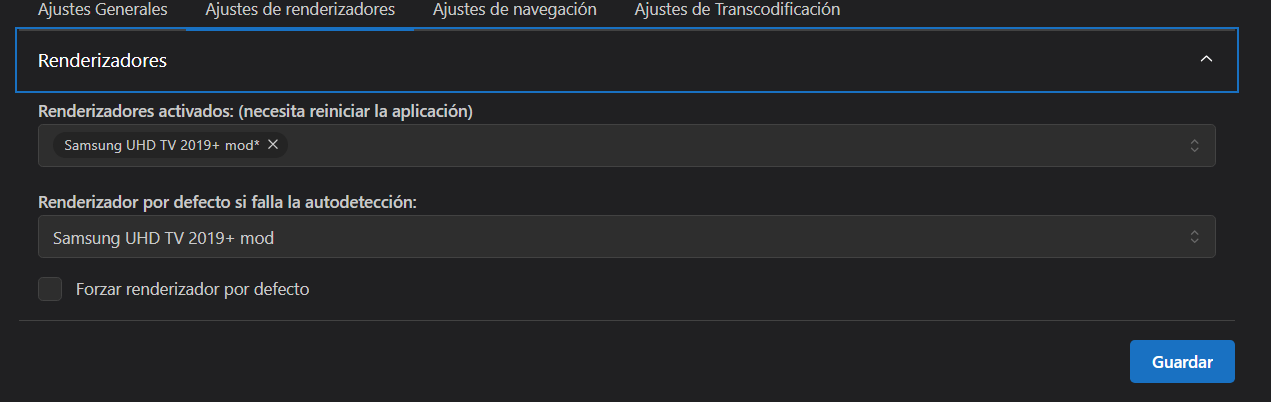
Still not working with new profiles. I did this to force the app to use them
Here are the logs.
Still not working with new profiles. I did this to force the app to use them
Here are the logs.
- Attachments
-
- ums_dbg_2026-08-20-13-10.zip
- (143.8 KiB) Downloaded 210 times
Re: Not working Samsung s95 Oled
OK I see the reason for transcoding now is because there are subtitles and these need to be burned into the video.
If you turned off subtitles (or deleted/moved the sub-file titans.srt) it would be remuxed.
This is one of the downsides of transcoding that subtitles have to be burned in to be able to see them and you cannot change it without restarting the video.
One thing that might work is to stream external subtitles (internal ones won't work) but is dependant on the device
you could add "StreamSubsForTranscodedVideo = true" to the conf and in theory it would allow remuxing of the video.
It is quite common for videos to fail to play when transcoding a video with a lot of subs (that video has over 20 internal subs) as it takes a bit of time for them to be processed first so the TV can time out while waiting.
Usually if played again immediately it can work as there will be a cache of the subs from last attempt.
Enabling the GPU will speed it up too.
HLS is another way of transcoding which should not have this problem and does not need to burn them in so can be selected as needed on the TV
If your TV supports it then this conf will enable it.
I would need to see examples of other videos that you are using "no transcoding" with as those should not be automatically transcoding if the TV can play them.
You don't need to change the default renderer, it should automatically detect it.
Make sure when packing logs the renderer conf is selected too as it confirms it is being used.
Code: Select all
Not muxing the video stream with FFmpeg because we need to burn subtitles.
Not muxing the video stream with FFmpeg because video filters are being applied.This is one of the downsides of transcoding that subtitles have to be burned in to be able to see them and you cannot change it without restarting the video.
One thing that might work is to stream external subtitles (internal ones won't work) but is dependant on the device
you could add "StreamSubsForTranscodedVideo = true" to the conf and in theory it would allow remuxing of the video.
Code: Select all
# Whether to stream subtitles even if the video is transcoded. When enabled the
# subtitles are not transcoded. It may work on some renderers.
# Supported subtitles are defined in SupportedExternalSubtitlesFormats.
# Default: false
StreamSubsForTranscodedVideo = Usually if played again immediately it can work as there will be a cache of the subs from last attempt.
Enabling the GPU will speed it up too.
HLS is another way of transcoding which should not have this problem and does not need to burn them in so can be selected as needed on the TV
If your TV supports it then this conf will enable it.
- Samsung-TV-2019+ hls.conf
- (10.51 KiB) Downloaded 263 times
I would need to see examples of other videos that you are using "no transcoding" with as those should not be automatically transcoding if the TV can play them.
You don't need to change the default renderer, it should automatically detect it.
Make sure when packing logs the renderer conf is selected too as it confirms it is being used.
Logs are important for us to help, Please follow This Link before asking for support. Just a forum cleaner, Will help if I can but no expert.
Re: Not working Samsung s95 Oled
Thank you for answers.
I think i get it. But i dont like it hehe.
So my TV plays everything perfect, except DTS. If i play a mkv video h264 or h265, with lets say 20 subtitles and DDP 5.1 Atmos, i dont need to transcode anything. With just "Passthrough" the file it will correctly play it. I can even select the different subtitle languages, the different audio tracks....
But the problem is when DTS is the audio track. It will play the second track which is usually an ac3 with Director commentary and stuff.
I thought the program will be able to don't transcode the video, dont transcode the subtitles, just transcode the audio. But if i got it right, that is no possible?
What i do manually with ffpmeg is just convert first track to eac3 like this: -map 0 -c:v copy -c:a eac3 -cutoff 20K -b:a 400K -ac 6
It will copy everything but the first audio track which will convert to eac3 6 channels.
Then i dont transcode anything, and when i see the movie file in the TV it shows as format -matrovska. But when i see it with this program transcoding, the file is called something like format -mpegURL. With the other renderers files it showed different so i guess is using the last one you sent me.
*************************************************************************************
Now i am gonna answer your things. Sorry for talking too much. I installed the program again so everything is default.
When it has to transcode it is still not working. But it is working with no transcode as usual. Even the same file, cause like i said before, it just skips the first track which is DTS and play the second track which is AC3 with Director's commentary.
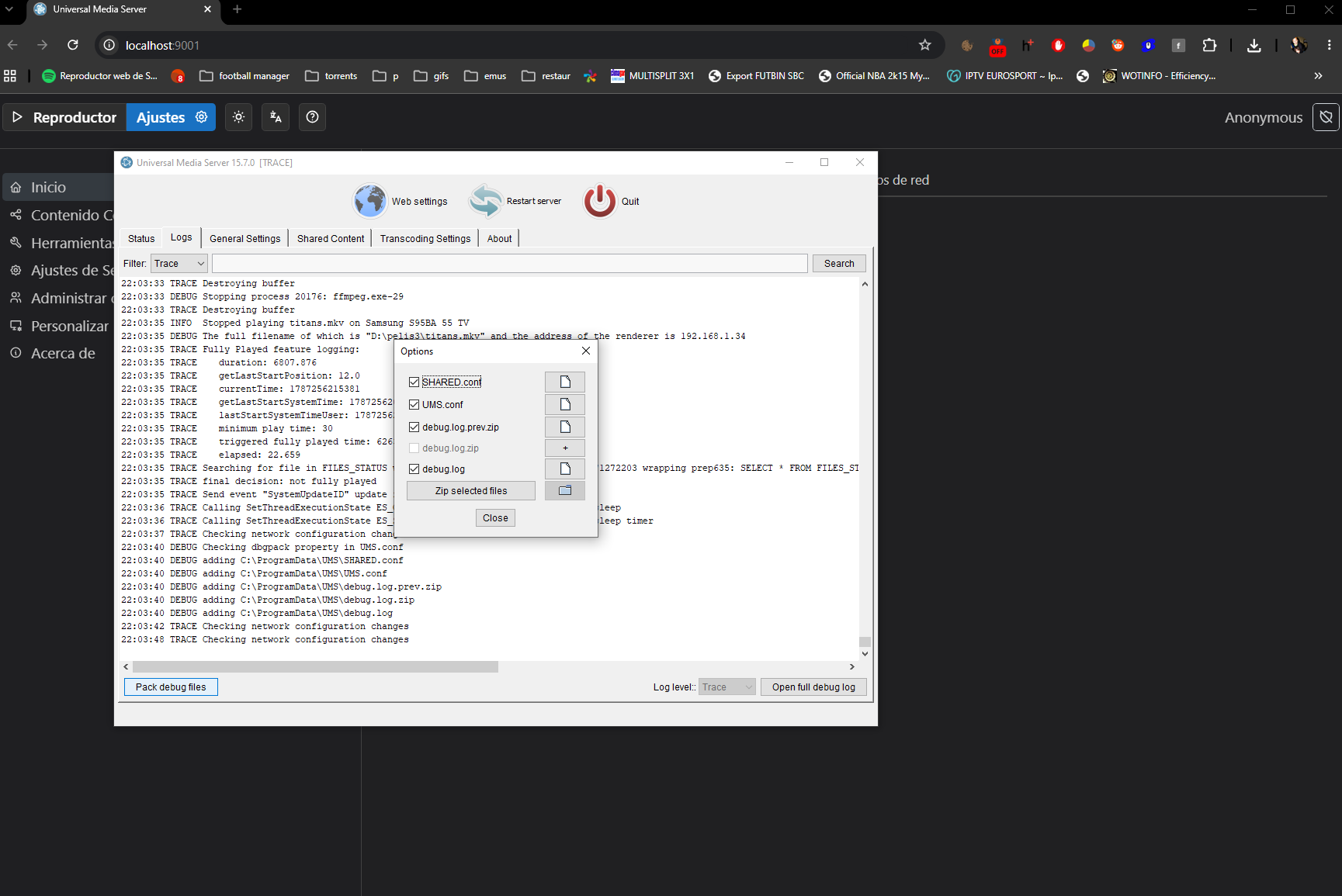
The debug i am posting is using the method with settings (old) and i will make sure that everything is selected. First i play the movie with no transcoding, then with transcode and wont play. I will post picture about how i am taking the logs.
I will pack the file with no subtitles using mkvtoolnix and see if the 20+ subtitles is the problem.
Yea. With no subs it will play it, no HDR and stereo sound but play it. I am gonna try with other config. But if it cannot passthrough the subs tracks so there is no problem i think it is a no for me this aplication. Cause it takes me as much time to remove the subs from the file than encode the DTS track to EAC3.
Then i removed your renderer Samsung-TV-2019+ hls.conf and it does not work. The file shows as format vnd-dlna-mpeg-tts or something like that and wont play. The only one that worked was the HLS but no HDR and stereo sound.
I think i get it. But i dont like it hehe.
So my TV plays everything perfect, except DTS. If i play a mkv video h264 or h265, with lets say 20 subtitles and DDP 5.1 Atmos, i dont need to transcode anything. With just "Passthrough" the file it will correctly play it. I can even select the different subtitle languages, the different audio tracks....
But the problem is when DTS is the audio track. It will play the second track which is usually an ac3 with Director commentary and stuff.
I thought the program will be able to don't transcode the video, dont transcode the subtitles, just transcode the audio. But if i got it right, that is no possible?
What i do manually with ffpmeg is just convert first track to eac3 like this: -map 0 -c:v copy -c:a eac3 -cutoff 20K -b:a 400K -ac 6
It will copy everything but the first audio track which will convert to eac3 6 channels.
Then i dont transcode anything, and when i see the movie file in the TV it shows as format
-matrovska. But when i see it with this program transcoding, the file is called something like format -mpegURL. With the other renderers files it showed different so i guess is using the last one you sent me.*************************************************************************************
Now i am gonna answer your things. Sorry for talking too much. I installed the program again so everything is default.
When it has to transcode it is still not working. But it is working with no transcode as usual. Even the same file, cause like i said before, it just skips the first track which is DTS and play the second track which is AC3 with Director's commentary.
The debug i am posting is using the method with settings (old) and i will make sure that everything is selected. First i play the movie with no transcoding, then with transcode and wont play. I will post picture about how i am taking the logs.
I will pack the file with no subtitles using mkvtoolnix and see if the 20+ subtitles is the problem.
Yea. With no subs it will play it, no HDR and stereo sound but play it. I am gonna try with other config. But if it cannot passthrough the subs tracks so there is no problem i think it is a no for me this aplication. Cause it takes me as much time to remove the subs from the file than encode the DTS track to EAC3.
Then i removed your renderer Samsung-TV-2019+ hls.conf and it does not work. The file shows as format vnd-dlna-mpeg-tts or something like that and wont play. The only one that worked was the HLS but no HDR and stereo sound.
- Attachments
-
- ums_dbg_2026-08-20-22-03.zip
- (637.86 KiB) Downloaded 241 times
Re: Not working Samsung s95 Oled
Commentary tracks complicate things.
Usually when a TV sees that one audio track is in an unsupported format it will automatically skip it to play the next supported one.
When UMS checks if a video is supported it used to allow it to stream as long as the video and at least 1 audio stream is supported.
Now if the first track it unsupported it will transcode.
There is currently no good way for UMS to know if the other audio tracks are commentary as usually they just have the same language tag, or it might just be the same audio but in AC3 instead of DTS.
I think attempts have been made to improve this but has been unreliable with too many false positives.
One problem with transcoding video is that it does not preserve the HDR data.
I think this is because FFmpeg does not report something in the metadata so UMS cannot use in the command to save it, but I know very little of the process.
And it is better to be able to play a video even if something is lost than not being able to play at all.
I think this is a common problem with other media servers.
The way around to preserve HDR is to remux (Passthrough) instead of transcode so it copies the video stream while converting the unsupported audio.
However as the output only has one audio stream and no subtitles, if there are subtitles that are required these have to be burned in which means a full transcode of the video which will lose HDR.
I think this is a limitation on the MPEGTS container that does not support multiple streams like a MKV file has.
Some devices will support streaming subs separately and this might be a workaround if you need them. I have altered this conf to do that.
This will only work with external sub files though. It would be too slow to extract internal subs first to stream them as it has been tried before.
If you do not want subs then make sure there are no sub files in the same folder as the video (.srt) and turn off subtitles in the settings and it should just remux automatically if the audio uses DTS.
I think the best solution is to avoid videos that use DTS altogether and find another source.
Or you could manually remux/transcode DTS audio tracks separately so UMS can just stream it to the TV unaltered. You do not need to remove the subs either.
There are several ways to do this like doing it by hand with FFmpeg, but something like MKVtools would probably be easier if you had to do it regularly.
I think you can set up some automation to do this and should not take long to only change the audio.
When using the hls transcoding method it is basically a playlist of tiny segments that can be switched easily to another audio track/subtitle which is more flexible. Its the same way Youtube works.
Because of this it will show as a *-mpegURL file instead of the original .mkv
The same thing happens with normal transcoding and would show as .mpeg for example.
When it works HLS should be like if it was streaming instead of transcoding and allow switching of audio and subs during playback.
I checked the packing logs box on v15.8.0 and it does not give the option to attach the renderer conf like it should.
I'll report this as it should be including them.
Usually when a TV sees that one audio track is in an unsupported format it will automatically skip it to play the next supported one.
When UMS checks if a video is supported it used to allow it to stream as long as the video and at least 1 audio stream is supported.
Now if the first track it unsupported it will transcode.
There is currently no good way for UMS to know if the other audio tracks are commentary as usually they just have the same language tag, or it might just be the same audio but in AC3 instead of DTS.
I think attempts have been made to improve this but has been unreliable with too many false positives.
One problem with transcoding video is that it does not preserve the HDR data.
I think this is because FFmpeg does not report something in the metadata so UMS cannot use in the command to save it, but I know very little of the process.
And it is better to be able to play a video even if something is lost than not being able to play at all.
I think this is a common problem with other media servers.
The way around to preserve HDR is to remux (Passthrough) instead of transcode so it copies the video stream while converting the unsupported audio.
However as the output only has one audio stream and no subtitles, if there are subtitles that are required these have to be burned in which means a full transcode of the video which will lose HDR.
I think this is a limitation on the MPEGTS container that does not support multiple streams like a MKV file has.
Some devices will support streaming subs separately and this might be a workaround if you need them. I have altered this conf to do that.
This will only work with external sub files though. It would be too slow to extract internal subs first to stream them as it has been tried before.
- Samsung-TV-2019+ stream subs.conf
- (10.62 KiB) Downloaded 209 times
If you do not want subs then make sure there are no sub files in the same folder as the video (.srt) and turn off subtitles in the settings and it should just remux automatically if the audio uses DTS.
I think the best solution is to avoid videos that use DTS altogether and find another source.
Or you could manually remux/transcode DTS audio tracks separately so UMS can just stream it to the TV unaltered. You do not need to remove the subs either.
There are several ways to do this like doing it by hand with FFmpeg, but something like MKVtools would probably be easier if you had to do it regularly.
I think you can set up some automation to do this and should not take long to only change the audio.
When using the hls transcoding method it is basically a playlist of tiny segments that can be switched easily to another audio track/subtitle which is more flexible. Its the same way Youtube works.
Because of this it will show as a *-mpegURL file instead of the original .mkv
The same thing happens with normal transcoding and would show as .mpeg for example.
When it works HLS should be like if it was streaming instead of transcoding and allow switching of audio and subs during playback.
I checked the packing logs box on v15.8.0 and it does not give the option to attach the renderer conf like it should.
- Screenshot 2026-08-21 113750.png (20.93 KiB) Viewed 14875 times
Logs are important for us to help, Please follow This Link before asking for support. Just a forum cleaner, Will help if I can but no expert.